GREEN COFFEE INVENTORY · ROAST BATCH

Let green coffee inventory move with the roasts that actually consume it.

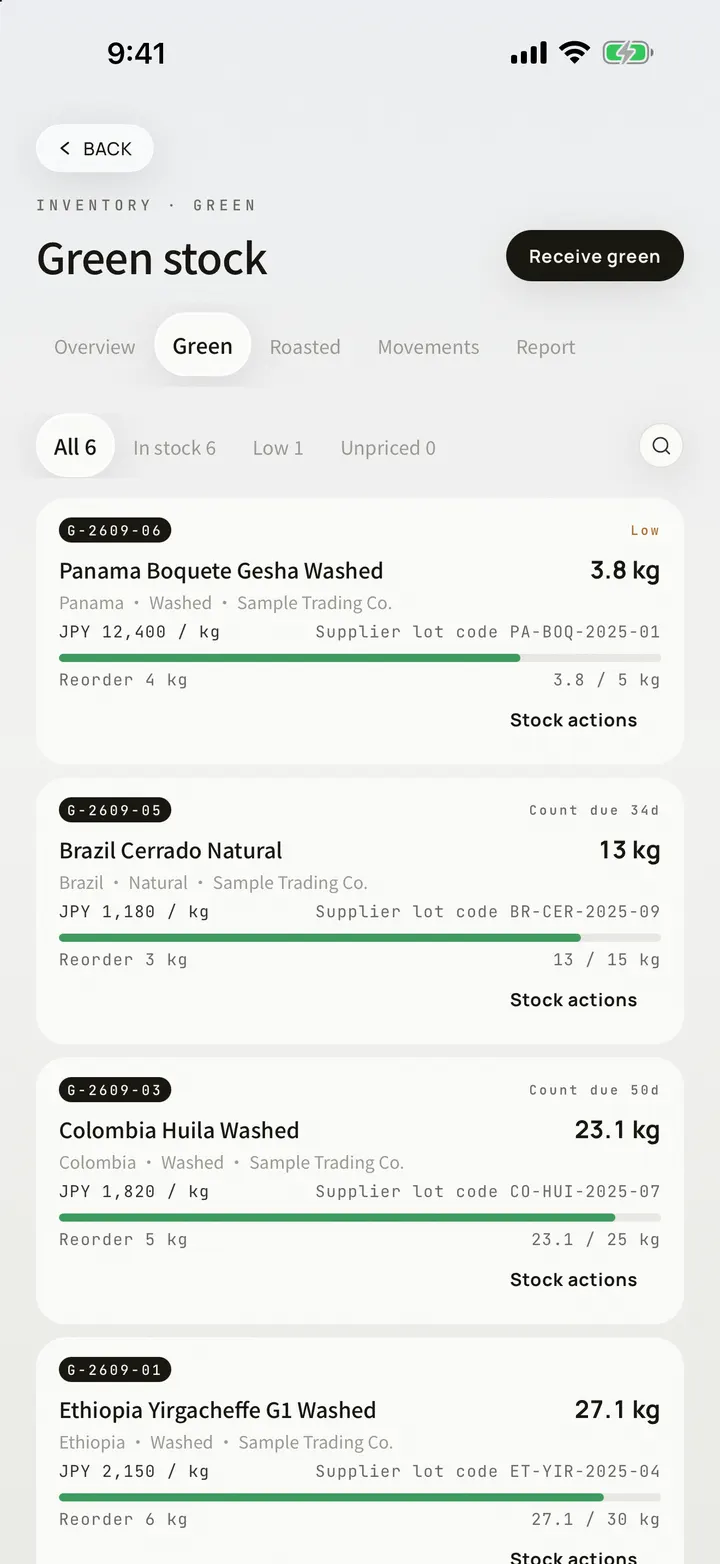
OLLA keeps lightweight inventory inside Roast Lab: a green lot can retain physical data, defect weighting, and Lot Status; charging a batch deducts its green stock, dropping the roast records roasted weight, and the same batch can continue into bean cards, cupping, and brewing.

INVENTORY · ROAST TO CUP
GREEN LOTCHARGEROAST BATCHROASTED WEIGHTBEAN CARD

LOT TO BATCH

Inventory belongs inside the roast record, not in a second spreadsheet.

Once a green lot enters production, stock movement and roast history can follow the same path, reducing the need to reconcile a separate inventory sheet after the batch is already finished.

01

Create the green lot

Keep the lot together with Green Physical, Defect Weighting, and Lot Status information.

02

Consume stock at charge

Link charge weight to the green lot. Starting the roast automatically deducts that quantity from green inventory.

03

Record roasted output

Enter roasted weight at drop so green input and roasted output remain attached to the same batch, alongside roast results such as weight loss.

04

Continue into Roast to Cup

Turn the completed batch into a bean card, then connect cupping, brewing, and reports without losing the inventory context.

GREEN LOT RECORD

Start inventory with a specific green coffee lot.

OLLA structures lightweight inventory around coffee lots rather than one anonymous stock total. The green record can retain physical data, weighted defects, and lot status so later batch consumption still knows which raw material it came from.

  • Green Physical records for the green lot
  • Defect Weighting information
  • Lot Status for the batch
  • A persistent link from green lot into later roast batches

BATCH CONSUMPTION

Update stock from actual charge weight, not a month-end estimate.

Inventory changes when roasting happens. The charge weight recorded on the roast timeline is linked to its green lot and deducted from that inventory, keeping stock balance and production history on the same source of truth.

  • Charge weight links to a specific green lot
  • Starting a roast automatically deducts green stock
  • Batch events, controls, and stock consumption stay in the Roast Lab record
  • Less duplicate entry between a roast log and a separate stock sheet

ROASTED OUTPUT

At drop, turn green consumption into a recorded roasted output.

Enter the actual roasted weight after the batch so green input and roasted output remain together. The batch can retain results such as weight loss and then become a bean card for the next stages of the coffee's history.

  • Record actual roasted weight per batch
  • Keep green input and roasted output in the same record
  • Retain roast results such as weight-loss percentage
  • Generate a bean card and continue into cupping and brewing

STOCK REPORT · LOCAL FIRST

Export a lightweight stock record when the handoff needs one.

OLLA's export set includes a lightweight inventory report for archiving or sharing current stock context alongside roast work. The app remains local-first: records are stored on the device by default, with iCloud sync left to the user.

  • Lightweight inventory report export
  • Traceable relationship between stock and roast batches
  • Records stored locally by default
  • Optional iCloud sync

CURRENT SCOPE

Keep the green → roast batch → roasted output chain clear first.

This page describes inventory capabilities already stated in the current OLLA product. It does not present purchasing, accounting, or ERP modules that are not part of the published feature set as if they already shipped.

  • Core scope: green lots, stock deduction, roast batches, and roasted output
  • Core connection: inventory → Roast Lab → bean card → cupping / brew
  • No purchase-order, COGS, or accounting claims on this page
  • No multi-warehouse, wholesale-order, or full-ERP claims on this page

TRACE THE COFFEE

Follow one green lot from inventory into the cup record.

When green consumption, roast output, bean cards, cupping, and brewing share one chain, inventory becomes more than a balance: it becomes part of the Roast-to-Cup traceability record.

GREEN LOTROASTROASTEDBEAN CARDCUPPINGBREW

OLLA ROAST LAB

Let the next roast update inventory from the same batch record.

OLLA Brew Lab runs on iPhone and iPad with English, Chinese, and Japanese interfaces.